search_defi_uxFreeFree-text search across the entire corpus - rubric areas, named patterns, and the glossary - ranked by relevance.
Corpus
An MCP server that gives AI agents the Ray Group DeFi UX rubric, patterns, glossary, personas, visual references, flow graphs, and Pro audit worksheets. Install once — Claude Desktop, Cursor, Codex, Claude Design.
What the server exposes
Browse by category. Free tools work with no API key; Pro tools unlock with RAYGROUP_API_KEY.
search_defi_uxFreeFree-text search across the entire corpus - rubric areas, named patterns, and the glossary - ranked by relevance.
Corpus
list_categoriesFreeReturns the full top-level structure of the corpus - every rubric area, every pattern slug, every glossary entry slug.
Corpus
get_rubricFreeReturns the eight-area DeFi UX rubric with criteria and evidence prompts. Optionally filter to a single area.
Rubric
get_patternFreeReturns named DeFi UX patterns. Filter by slug, by category (onboarding, transaction, risk, wallet, trading, error, novice-expert), or by rubric area.
Patterns
get_glossary_entryFreeReturns a cognitive-bias / heuristic / principle entry with its DeFi-specific manifestation and the design levers that mitigate it.
Glossary
get_personaFreeCritique personas with stress questions and failure modes - novice trader, compliance officer, mobile-only user, and more.
Personas
get_case_studyProPro. Named-protocol case studies with scored findings and remediations you can cite in reviews.
Flows & refs
get_referenceProPro. Visual reference boards agents can cite while critiquing a screen - confirm, onboarding, leverage, approvals.
Flows & refs
get_flowProPro. Happy / unhappy / edge path graphs for full-flow critique before redesign.
Flows & refs
audit_screenshotProPro. Rubric-aligned scoring worksheet from a screenshot plus observed elements - consistent instrument every run.
Audits
audit_protocolProPro. Multi-page protocol audit plan: surface map, priority order, and worksheet hooks per page.
Audits
What it is
An MCP server that exposes the Ray Group DeFi UX rubric, named patterns, cognitive-bias glossary, critique personas, visual references, flow graphs, and Pro audit tools (audit_screenshot, audit_protocol) as callable tools for any MCP client.
How it works
Clone the repo, run npm install and npm run build, and add a four-line entry to your AI client's MCP config (Claude Desktop, Cursor, Codex, Claude Design). Free tier: full 8-area rubric, 10 patterns, 5 glossary entries, 2 personas — MIT, no API key. Pro ($29/mo): 50+ patterns, 30+ glossary, case studies, reference boards, flow graphs, audit_screenshot, audit_protocol.
Why it's worth it
A tool call returns the exact rubric criteria, named pattern, persona stress questions, or audit worksheet Ray Group actually uses - not a paraphrase from training data. Score screens and full flows the same way every time, then stress-test with personas before team review.
Why an MCP server
Most UX frameworks live in PDFs and blog posts - you read them once, then forget them at the moment you actually need them. An MCP server flips that round. The Ray Group DeFi UX framework becomes something your AI assistant calls directly, every time you ask it to review a screen, a flow, or a transaction. The rubric is one tool call away. The named patterns are searchable. The cognitive biases are looked up by the model and applied to your specific context, not yours to remember.
See it in action
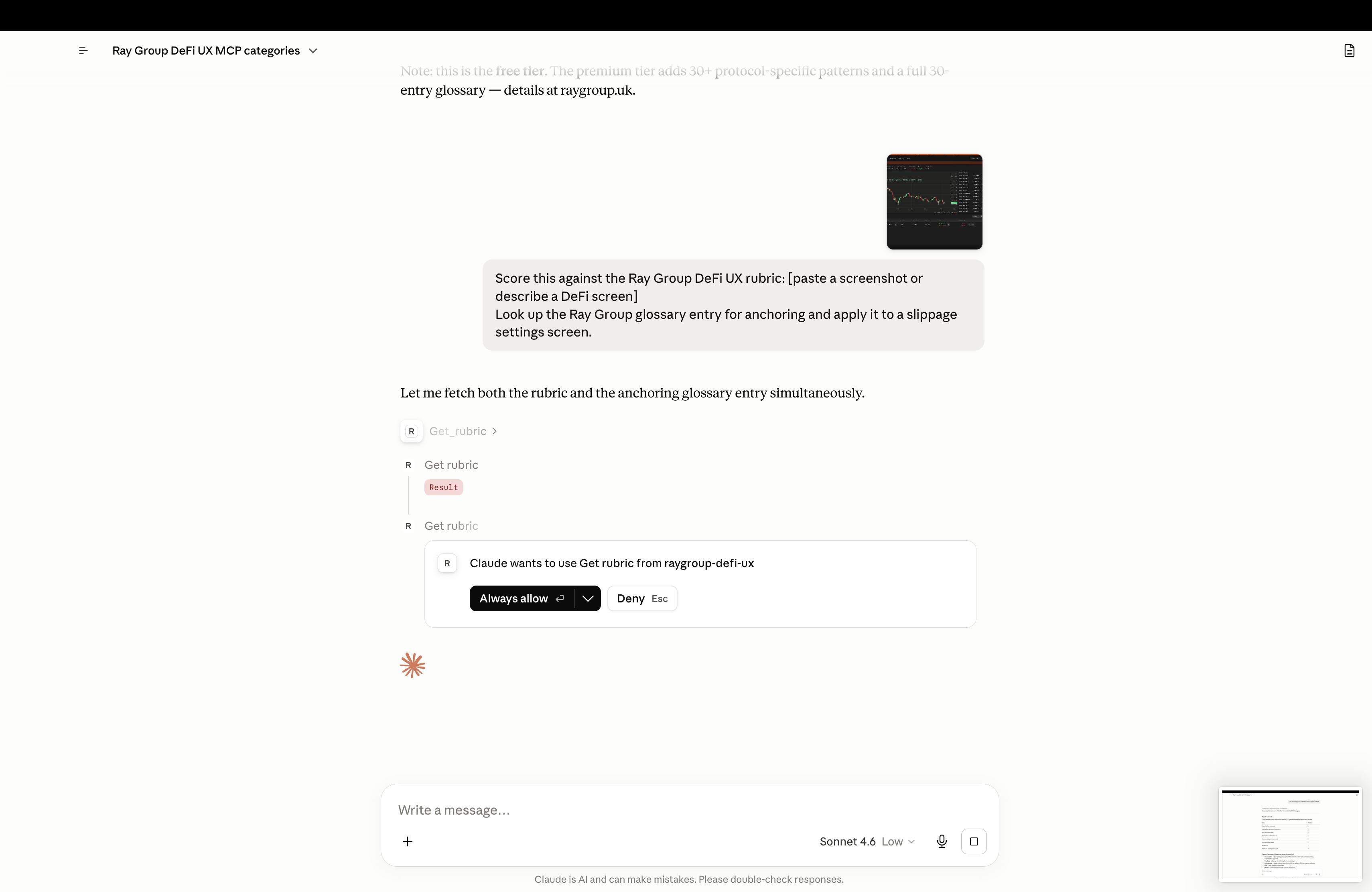
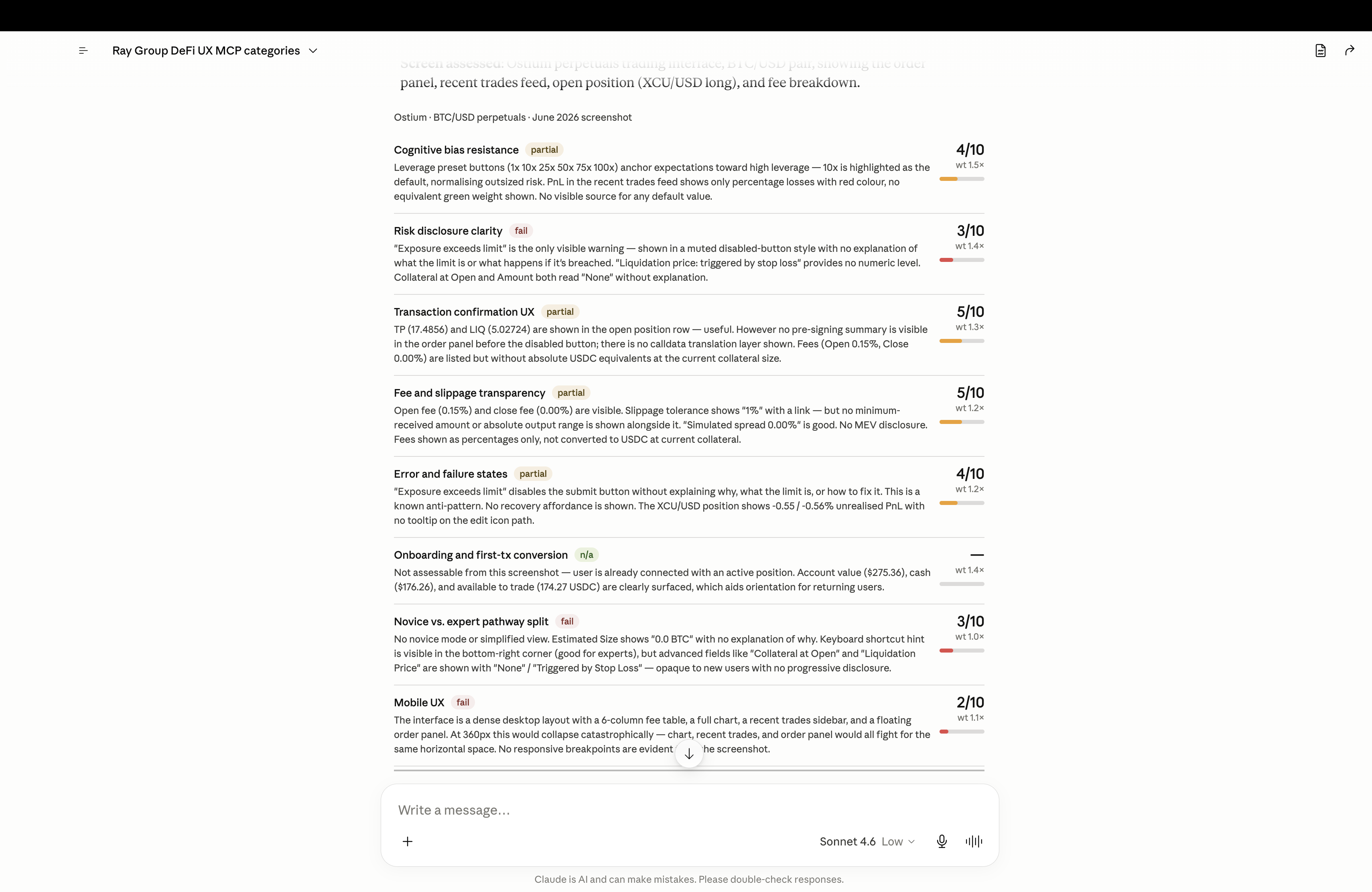
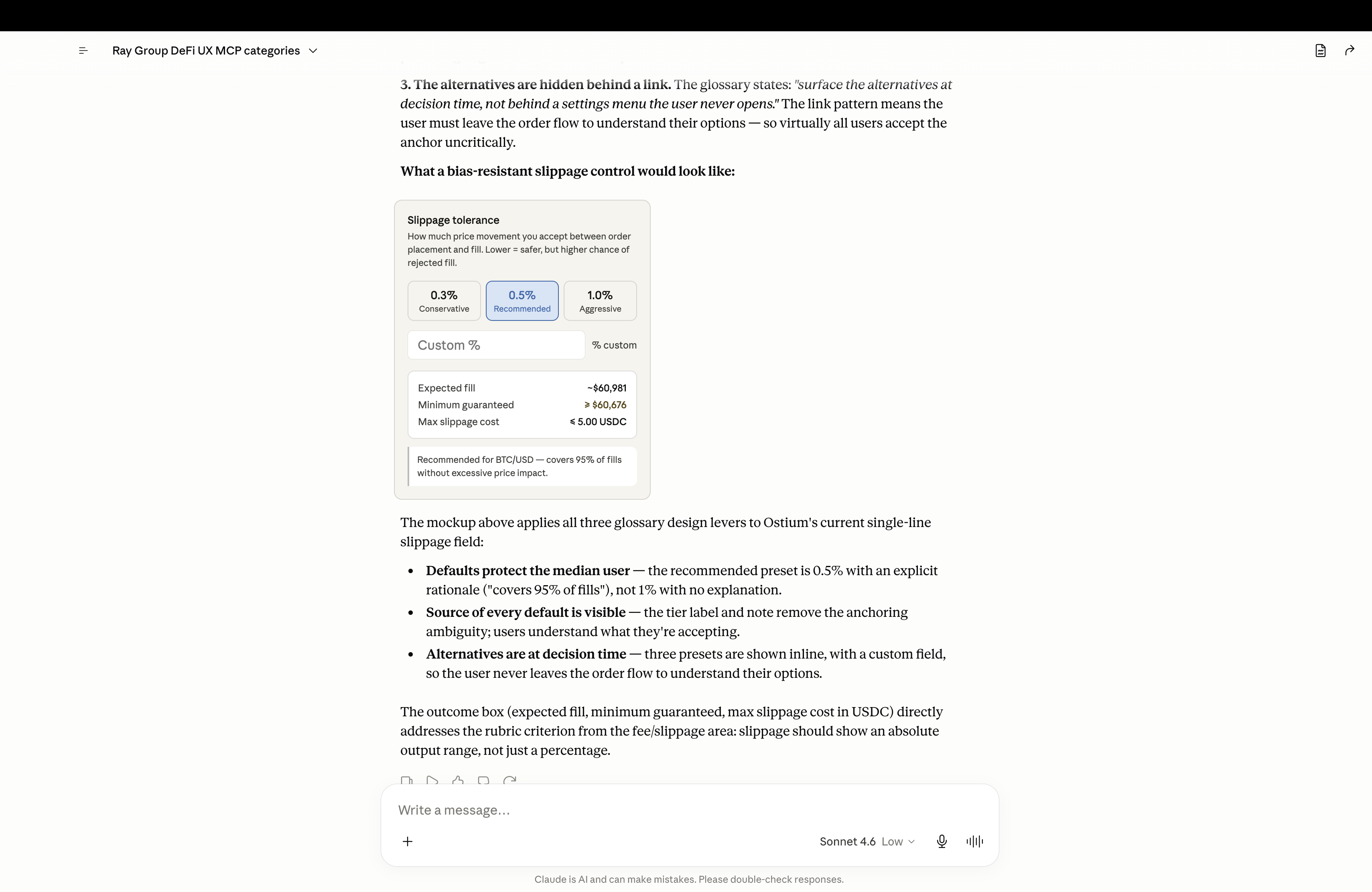
Here's a real run inside an MCP-connected AI client. The user pastes a screenshot of a BTC/USD perps DEX and asks for an audit. The model calls the Ray Group tools directly, scores the interface against the rubric, then applies the anchoring glossary entry to propose a concrete redesign.
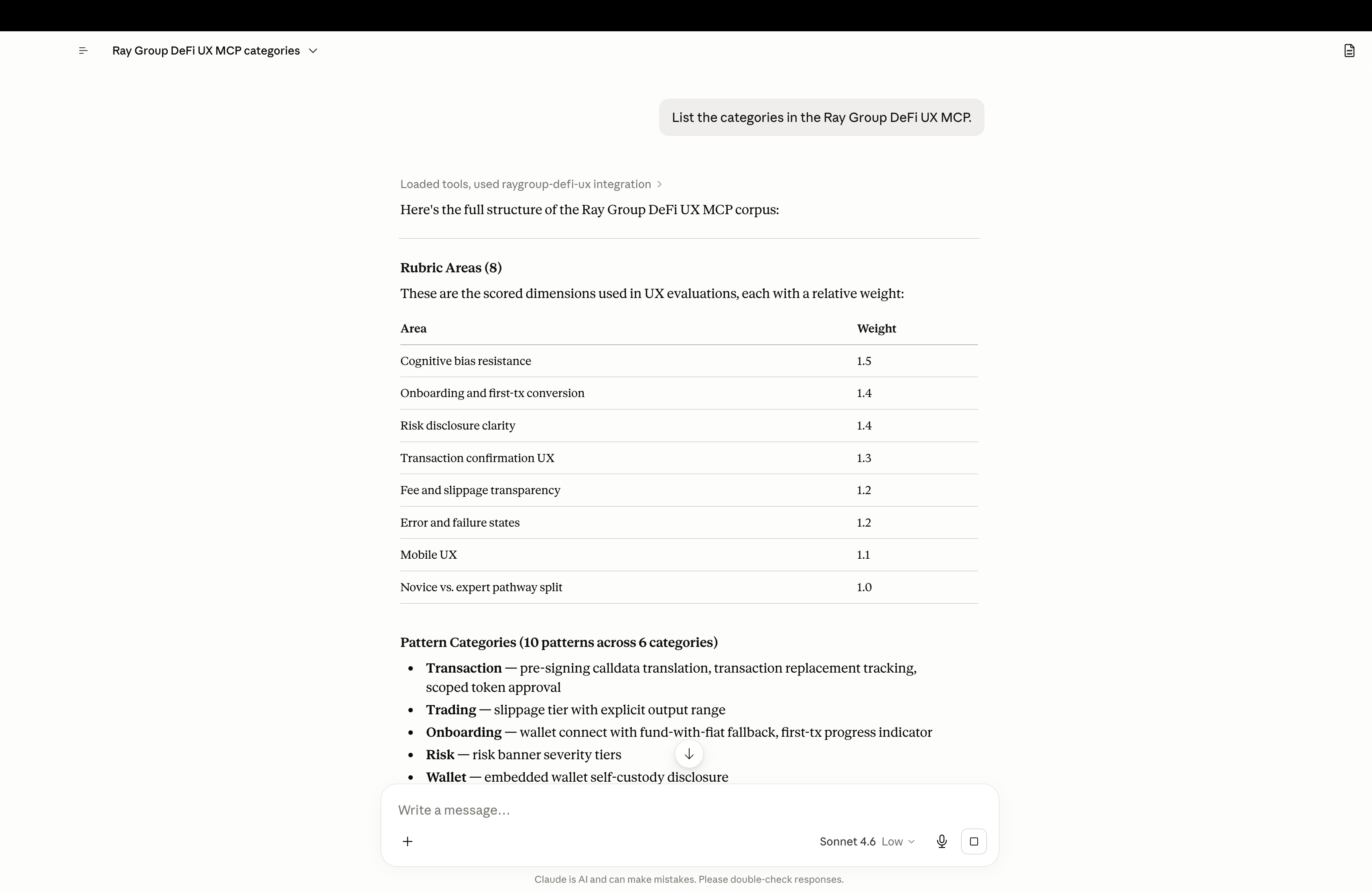
Step 1. list_categories returns the full corpus structure - 8 weighted rubric areas, 10 named patterns grouped by category, and the glossary index.
Example audit · transcript
The same scored output you saw in the carousel - rendered here as text so it's readable, searchable, and accessible to assistive tech and answer engines.
3.7/10
Weighted · 7 scored areas
Leverage preset buttons (1× · 10× · 25× · 50× · 75× · 100×) anchor expectations toward high leverage - 10× is the highlighted default, normalising outsized risk. The trades feed shows only percentage losses in red, with no equivalent green weight and no source for the default.
“Exposure exceeds limit” is the only visible warning - shown in a muted, disabled-button style with no explanation of what the limit is or what happens if it's breached. Collateral fields read “None” without explanation.
Take-profit and liquidation levels are shown in the open-position row - useful. But there is no pre-signing summary and no calldata-translation layer before the wallet prompt.
Open and close fees are visible. Slippage tolerance shows “1%” with a link - but no minimum-received amount or absolute output range alongside it, and no MEV disclosure. Fees shown as percentages only.
“Exposure exceeds limit” disables the submit button without explaining why, what the limit is, or how to fix it - a known anti-pattern. No recovery affordance is shown.
Not assessable from this screenshot - the user is already connected with an active position.
No novice or simplified view. A keyboard-shortcut hint is good for experts, but advanced fields are shown with placeholder values and no progressive disclosure for new users.
A dense desktop layout - a multi-column fee table, full chart, trades sidebar, and floating order panel. At 360px this would collapse catastrophically; no responsive breakpoints are evident.
Anchoring, applied
The bias-resistant control it proposes
Slippage tolerance
How much price movement you accept between order placement and fill. Lower = safer, but higher chance of a rejected fill.
0.3%
Conservative
0.5%
Recommended
1.0%
Aggressive
Recommended for BTC/USD - covers 95% of fills without excessive price impact.
Illustrative run. Scores and findings are generated by the AI client from the rubric the MCP server returns - not pre-written.
The corpus
The free tier ships with the full rubric and a deliberate first cut of patterns and glossary entries. The premium tier extends each section significantly, but the free tier is genuinely useful from day one - and it stays free.
Cognitive bias resistance, risk disclosure, transaction confirmation, fee and slippage transparency, error and failure states, onboarding and first-tx, novice vs. expert split, and mobile UX. Each with criteria, evidence prompts, and common anti-patterns.
Pre-signing calldata translation, slippage tier with output range, wallet connect with fund-with-fiat fallback, transaction replacement tracking, risk banner severity tiers, embedded-wallet self-custody disclosure, scoped token approval, first-tx progress indicator, network mismatch recovery, and expert keyboard shortcuts.
Anchoring, loss aversion, action bias, framing effect, and choice overload - each with the bias's general definition, its specific manifestation in DeFi, and the design levers that mitigate it.
Install
Clone, build, and add four lines to your AI client's config. That's it. The server runs locally over stdio - no account, no API key, no network round-trip per call.
We'd like to know who's trying DeFi UX MCP. Your email unlocks the instructions below - we won't add you to a newsletter.
Frequently asked
Pro tier
Everything in Free, plus the extended corpus, hosted transport, and priority support for teams shipping DeFi UX.
Per seat · billed via Stripe